
Hash tables are one of the highest ROI data structures in both interviews and real systems: by trading a small amount of memory overhead for fast membership queries and lookups, you can transform "scan all elements" solutions into near-linear time workflows. This guide builds reusable hash table thinking patterns through three LeetCode classics —Two Sum, Longest Consecutive Sequence, and Group Anagrams— to teach you what to store, how to design keys, and how to avoid common boundary-case bugs. We'll also cover advanced patterns (complement search, frequency counting, sliding window), performance comparisons, interview tips, and a debugging checklist.
Series Navigation
📚 LeetCode Algorithm Masterclass Series (10 Parts): 1. → Hash Tables (Two Sum, Longest Consecutive, Group Anagrams) ← You are here 2. Two Pointers Techniques (Collision pointers, fast-slow, sliding window) 3. Linked List Operations (Reverse, cycle detection, merge) 4. Binary Tree Traversal & Recursion (Inorder/Preorder/Postorder, LCA) 5. Dynamic Programming Intro (1D/2D DP, state transition) 6. Backtracking Algorithms (Permutations, combinations, pruning) 7. Binary Search Advanced (Integer/Real binary search, answer binary search) 8. Stack & Queue (Monotonic stack, priority queue, deque) 9. Graph Algorithms (BFS/DFS, topological sort, union-find) 10. Greedy & Bit Manipulation (Greedy strategies, bitwise tricks)
Quick Refresher: What Hash Tables Provide
For a good hash function and typical workload, hash tables offer:
- Insertion: Average
- Lookup: Average
- Deletion: Average
Worst-case can degrade (e.g., adversarial collisions), but for interview problems and most real use cases, the average case is what matters.
In Python:
dictis a hash map (key → value)setis a hash set (membership only)
In Java:
HashMap<K,V>for key-value pairsHashSet<E>for unique elements
In C++:
unordered_map<K,V>for key-valueunordered_set<T>for membership
LeetCode 1: Two Sum
Problem Analysis
Core Challenge: The key difficulty lies in finding
two numbers that sum to the target value in a single pass. A brute-force
approach requires
Solution Approach: Use a hash table to store
"visited value → index" mappings. As we traverse the array, for each
current element num, the partner we need is
target - num (the complement). If this complement is
already in the hash table, we've found the answer; otherwise, store the
current value for future lookups. This "space-for-time" trade-off
reduces time complexity from
Complexity Analysis: - Time
Complexity:
Key Insight: The essence of the problem is "finding
pairs", and hash tables providenum itself, but for
target - num.
Problem Statement
Given an array of integers nums and an integer
target, return the indices of the two
numbers such that they add up to target. Each input has
exactly one solution, and you may not use the same element twice.
Example:
- Input:
nums = [2,7,11,15],target = 9 - Output:
[0,1](becausenums[0] + nums[1] = 9)
Constraints:
-
Brute Force Approach (For Comparison)
Naive solution: Check all pairs
1 | def twoSum_bruteforce(nums, target): |
Complexity:
Why it's bad: For nums.length = 10,000,
that's 50 million operations!
Hash Table Solution: The Complement Pattern
Core insight: When scanning left to right, maintain a mapping:
1 | value → index |
When you see num, the partner you need is
target - num (the complement). If it's
already in the map, you're done; otherwise, store the current value and
index.
Python Implementation
1 | from typing import List |
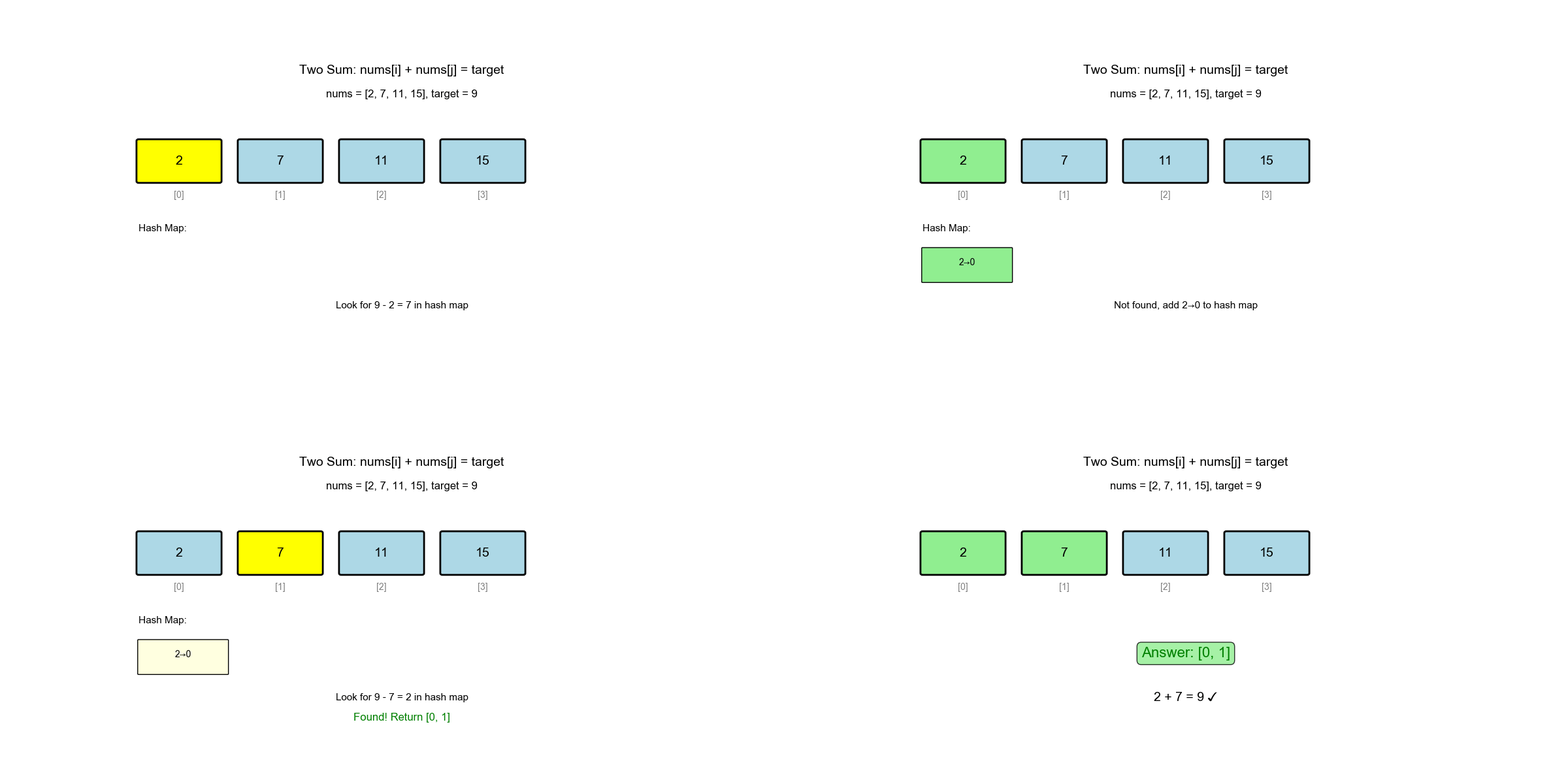
Algorithm Visualization: The animation below demonstrates the complete process of how the algorithm finds pairs using complement search:
Java Implementation
1 | class Solution { |
Why This Works
One-pass logic: 1. At indextarget - nums[i] was seen before 2. If yes, we found the
pair immediately 3. If no, store nums[i] → i for future
lookups
Time evolution (for
nums = [2, 7, 11, 15], target = 9):
| Step | i |
num |
complement |
seen |
Action |
|---|---|---|---|---|---|
| 1 | 0 | 2 | 7 | {} |
Not found, store {2: 0} |
| 2 | 1 | 7 | 2 | {2: 0} |
Found! Return [0, 1] |
Complexity Analysis
- Time:
(single pass) - Space:
(hash map stores up to entries)
Space-time tradeoff: We sacrifice
Deep Dive
Algorithm Principle: Why Does This Algorithm Work?
The core of the hash table solution lies in the complement
search pattern. When we see element nums[i], we're
not looking for it itself, but for its "other half" —
target - nums[i]. If this complement has appeared before
(stored in the hash table), we've found the complete pair.
Mathematical Proof: Suppose a solution
(i, j) exists such that
nums[i] + nums[j] = target, with i < j.
When the algorithm reaches index j: - nums[i]
has already been processed and stored as seen[nums[i]] = i
- Current element is nums[j], complement is
complement = target - nums[j] - Since
nums[i] + nums[j] = target, we have
complement = nums[i] - nums[i] is in
seen, algorithm returns [i, j] ✅
Time Complexity Proof: Why O(n)?
- Outer loop: Traverse array once,
- Hash table operations: Each
incheck and=assignment are average - Total time:
Worst case: If all elements hash to the same bucket (adversarial input), hash table operations degrade to , making total time . However, this is extremely rare in practice, and average case is what matters.
Space Optimization: Is There a More Space-Efficient Method?
For this problem, no. Reasons: 1. Need to return indices: Cannot sort (would destroy indices), must store index information 2. Unsorted array: Cannot use two pointers (requires sorting) 3. Single pass requirement: Must store information about visited elements
Variant Extension: If the problem asked for "return
the two values" (no indices needed), we could: - Sort first, then use
two pointers:
Common Mistakes Analysis
| Mistake Type | Wrong Code | Problem | Correct Approach |
|---|---|---|---|
| Check before insert | seen[num] = i; if complement in seen |
May use same element twice | Check first, then insert |
| Return order | return [i, seen[complement]] |
Wrong index order | return [seen[complement], i] |
| Sort destroys indices | Sort then two pointers | Lose original indices | Use hash table or store (value, index) tuples |
Variant Extensions
- Three Sum: Fix first number, use two sum on remaining part
- Four Sum: Fix first two numbers, use two sum on remaining part
- Two Sum II (Sorted Array): Can use two
pointers,
space - Two Sum (BST): Use inorder traversal + two pointers
Common Pitfalls & Edge Cases
Pitfall 1: Duplicate Values
Case: nums = [3, 3],
target = 6
Question: Does storing value → index
work if values repeat?
Answer: Yes, because we check before overwriting:
1 | # First iteration: i=0, num=3 |
Pitfall 2: "Same Element Twice" Misunderstanding
Constraint says: "You may not use the same element twice"
Confusion: Does this mean the same value or the same index?
Clarification: It means the same
index. So [3, 3] with
target = 6 is valid (different indices).
Pitfall 3: Don't Sort!
Temptation: "Let me sort first, then use two pointers"
Problem: Sorting destroys original indices, but the problem asks for original indices!
Solution: If you must use two-pointer approach,
store (value, original_index) tuples and sort by value.
Pitfall 4: Off-by-One in Return Order
Mistake:
1 | return [i, seen[complement]] # Wrong order! |
Correct:
1 | return [seen[complement], i] # Earlier index first |
Real-World Analogy
- E-commerce: "I have$100. Can these two items fit my budget?"
- Trading: "Do any two orders in this stream cancel out to the target exposure?"
- Chemistry: "Which two reactants combine to this molecular weight?"
LeetCode 128: Longest Consecutive Sequence
Problem Analysis
Core Challenge: The key difficulty is finding the
longest consecutive sequence in
Solution Approach: Use a hash set to store all
numbers, enabling
Complexity Analysis: - Time
Complexity:while loop, each number is visited at most
twice - Space Complexity:
Key Insight: Avoiding duplicate counting is the core optimization. If we count from every number, we'd count the same sequence multiple times. By counting only from starts, each sequence is counted exactly once.
Problem Statement
Given an unsorted array of integers, find the length of the longest
consecutive elements sequence. Your algorithm must run in
Example:
- Input:
nums = [100, 4, 200, 1, 3, 2] - Output:
4(sequence is[1, 2, 3, 4])
Constraints:
-
Why Not Just Sort?
Naive approach: Sort then scan for runs
1 | def longestConsecutive_sort(nums): |
Complexity:
Problem: Violates the
Hash Set Solution: Start from Sequence Beginnings
Key insight: A number
Algorithm
Put all numbers in a set for
membership queries For each number
: - If
is in the set, skip (not a start) - If
is not in the set, count consecutive numbers
- If
Python Implementation
1 | def longestConsecutive(nums): |
Why Is This
Misconception: "The inner while loop
makes it
Reality: Each number is visited at most twice: 1. Once in the outer loop 2. Once as part of a sequence (inner loop)
Proof: The inner while only runs when
num - 1 is not in the set. So each sequence
Total operations:
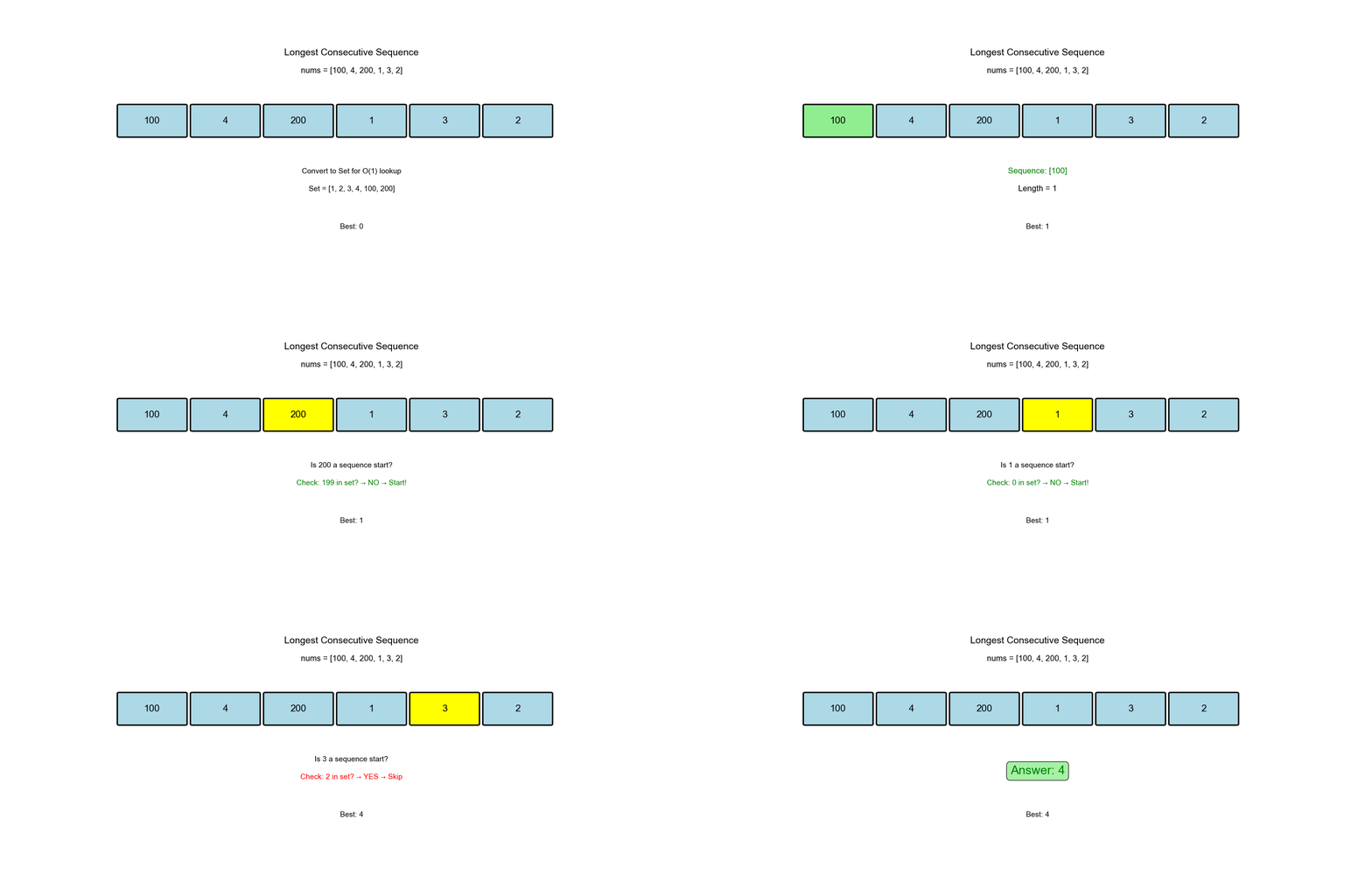
Algorithm Visualization: The animation below demonstrates how the algorithm identifies sequence starts and expands to count consecutive numbers:
Complexity Analysis
- Time:
(see proof above) - Space:
(hash set)
Deep Dive
Algorithm Principle: Why Count Only from Starts?
Key Insight: If we count from every number, we'd
count the same sequence multiple times. For example, for sequence
[1, 2, 3, 4]: - Counting from 1: count
1, 2, 3, 4 → length 4 - Counting from 2: count
2, 3, 4 → length 3 (duplicate) - Counting from
3: count 3, 4 → length 2 (duplicate) -
Counting from 4: count 4 → length 1
(duplicate)
By counting only from starts (num-1 not in set), each
sequence is counted exactly once.
Time Complexity Proof: Why O(n)?
Misconception: "The inner while loop
makes it
Reality: Each number is visited at most
twice: 1. Once in outer loop: Checked
as num whether it's a start 2. Once in inner
loop: Counted as part of some sequence
Proof: - Outer loop visits allwhile only runs
when num-1 is not in the set - Each sequence
Space Optimization: Is There a More Space-Efficient Method?
Method 1: Use Array as Hash Table (Only for Small
Range) If number range is known and small (e.g.,
[0, 1000]), use boolean array: 1
2
3
4
5# Only works for small number ranges
max_num = max(nums)
min_num = min(nums)
present = [False] * (max_num - min_num + 1)
# Space: O(range size), may be larger or smaller than O(n)
Method 2: In-place Marking (Requires Modifying
Input) If input array can be modified, use sign marking:
1
2# Mark visited numbers as negative (requires extra handling)
# Space: O(1) extra space, but destroys input
Trade-off: For general cases, hash set's
Common Mistakes Analysis
| Mistake Type | Wrong Code | Problem | Correct Approach |
|---|---|---|---|
| Count from every number | for num in nums: while num+1 in set |
Duplicate counting, |
Count only from starts |
| Use list instead of set | num_list = list(nums) |
Lookup is |
Use set() |
| Forget deduplication | Iterate nums directly |
Duplicate elements cause duplicate counting | Iterate set(nums) |
Variant Extensions
- Longest Consecutive Increasing Sequence (must be consecutive in array): Use dynamic programming
- Longest Consecutive Sequence (Allow Duplicates): Need to count frequencies
- Longest Consecutive Sequence (2D): Extend to 2D arrays
Example Walkthrough
Input:
nums = [100, 4, 200, 1, 3, 2]
Step 1: Build set
{100, 4, 200, 1, 3, 2}
Step 2: Iterate through set
num |
num-1 in set? |
Action | current_length |
|---|---|---|---|
| 100 | No (99 not in set) | Start sequence | Count 100 → length 1 |
| 4 | Yes (3 in set) | Skip | - |
| 200 | No (199 not in set) | Start sequence | Count 200 → length 1 |
| 1 | No (0 not in set) | Start sequence | Count 1,2,3,4 → length 4 |
| 3 | Yes (2 in set) | Skip | - |
| 2 | Yes (1 in set) | Skip | - |
Output: 4
Common Edge Cases
Edge Case 1: Empty Array
1 | nums = [] |
Edge Case 2: All Duplicates
1 | nums = [1, 1, 1, 1] |
Edge Case 3: No Consecutive Numbers
1 | nums = [1, 3, 5, 7, 9] |
Edge Case 4: Entire Array is Consecutive
1 | nums = [5, 1, 3, 4, 2] |
Edge Case 5: Negative Numbers
1 | nums = [-1, -2, 0, 1, 2] |
Real-World Applications
- Version control: Find longest sequence of consecutive commits
- Gaming: Detect longest win streak
- Time series: Find longest period without missing data
LeetCode 49: Group Anagrams
Problem Analysis
Core Challenge: The key difficulty lies in designing a hash key such that all anagrams map to the same key, while non-anagrams map to different keys. Anagrams have the same characters but different orders, so we need a canonical form to represent them uniformly.
Solution Approach: There are three main methods to
design hash keys: 1. Sorted String: Use sorted string
as key ("eat" → "aet") 2. Character
Count Tuple: Count frequency of each character, convert to
tuple as key 3. Fixed-Size Array: For lowercase English
letters (26), use length-26 count array
Complexity Analysis: - Method 1
(Sort):
Key Insight: Choosing the hash key is the core of
grouping problems. Sorting is simple and general, but character counting
is faster because counting is
Problem Statement
Given an array of strings, group the anagrams together. The order of groups doesn't matter.
Example:
- Input:
strs = ["eat","tea","tan","ate","nat","bat"] - Output:
[["bat"],["nat","tan"],["ate","eat","tea"]]
Constraints:
-strs[i]
consists of lowercase English letters
Key Insight: What Makes a Good Hash Key?
Anagrams have the same characters but different orders. We need a canonical form that's identical for all anagrams.
Option 1: Sorted String as Key
1 | from collections import defaultdict |
Example:
"eat"→ sorted →"aet""tea"→ sorted →"aet""ate"→ sorted →"aet"
All map to the same key!
Complexity:
- Time:
where , - Space:
Option 2: Character Count as Key (Faster!)
Instead of sorting, count character frequencies:
1 | from collections import defaultdict, Counter |
Complexity:
- Time:
(counting is , sorting 26 letters is ) - Space:
Faster because: Counting characters is , but sorting is .
Option 3: Fixed-Size Array as Key (Best for Lowercase English)
For lowercase English letters (26 total), use a fixed-size count array:
1 | def groupAnagrams_fastest(strs): |
Complexity:
- Time:
- Space:
Why fastest: No sorting at all, just one pass through each string.
Deep Dive
Algorithm Principle: Why Do These Methods Work?
Core Idea: The essence of anagrams is that they have the same character frequencies but different orders. Therefore, we need an order-independent representation as the hash key.
Method 1 (Sort): - After sorting, all anagrams
become the same string - "eat", "tea",
"ate" all sort to "aet" - Time complexity:
Sorting each string requires"eat" → {'e':1, 'a':1, 't':1} →
(('a',1), ('e',1), ('t',1)) - Time complexity: Counting
is
Method 3 (Fixed Array): - Use fixed-size array where
index corresponds to character position - "eat" →
[1,0,0,...,1,0,1] (a=1, e=1, t=1) - Time complexity: Only
one pass needed,
Time Complexity Proof: Why Is Method 3 Fastest?
Method 1: - Sort each string:
Space Optimization: Is There a More Space-Efficient Method?
Optimization 1: Use String as Key (Method 1) -
Space:
Optimization 2: Use Tuple as Key (Method 2, 3) -
Space:
Trade-off: For lowercase English letters, Method 3 is optimal: - Fixed 26 integers, small space overhead - No sorting, fastest time - Clean code
Common Mistakes Analysis
| Mistake Type | Wrong Code | Problem | Correct Approach |
|---|---|---|---|
| Use list as key | groups[count].append(s) |
Lists are not hashable | Use tuple(count) |
| Forget to sort count items | key = tuple(count.items()) |
Order may differ | tuple(sorted(count.items())) |
| Index calculation error | count[ord(c)] |
Index out of range | count[ord(c) - ord('a')] |
Variant Extensions
Anagram Detection: Check if two strings are anagrams
1
2# Method: Compare sorted strings or character counts
return sorted(s1) == sorted(s2)Find All Anagrams: Find all anagrams of a pattern in a string
- Use sliding window + character counting
- Time complexity:
Group Anagrams (Case Sensitive):
- Need to distinguish case, extend character set to 52
Complexity Comparison
| Method | Time | Space | Notes |
|---|---|---|---|
| Sorted string | Simple, general | ||
| Counter + sort | Faster, works for any charset | ||
| Fixed array | Fastest, limited to lowercase English |
Example Walkthrough
Input:
strs = ["eat", "tea", "tan", "ate", "nat", "bat"]
Using sorted string keys:
| String | Sorted Key | Group |
|---|---|---|
"eat" |
"aet" |
Group A |
"tea" |
"aet" |
Group A |
"tan" |
"ant" |
Group B |
"ate" |
"aet" |
Group A |
"nat" |
"ant" |
Group B |
"bat" |
"abt" |
Group C |
Output:
[["eat","tea","ate"], ["tan","nat"], ["bat"]]
Edge Cases
Edge Case 1: Empty String
1 | strs = [""] |
Edge Case 2: Single Character
1 | strs = ["a"] |
Edge Case 3: No Anagrams
1 | strs = ["abc", "def", "ghi"] |
Edge Case 4: All Anagrams
1 | strs = ["abc", "bca", "cab"] |
Real-World Applications
- Spell checking: Group typos by letter composition
- Genomics: Cluster DNA sequences with same nucleotide counts
- Data deduplication: Find records with same attributes (different order)
Advanced Hash Table Patterns
Pattern 1: Complement Search (Two Sum Variant)
Use when: You need to find pairs satisfying a condition
Examples:
- Three Sum (extend to triplets)
- Four Sum
- Count pairs with given difference
Pattern 2: Frequency Counting
Use when: You need to track occurrences
Examples:
- Top K Frequent Elements
- First Unique Character
- Valid Anagram (simpler than sorting)
1 | from collections import Counter |
Pattern 3: Sliding Window + Hash Map
Use when: Fixed-size window with tracking
Example: Longest Substring with At Most K Distinct Characters
1 | def lengthOfLongestSubstringKDistinct(s, k): |
Pattern 4: Prefix Sum with Hash Map
Use when: You need subarray sums
Example: Subarray Sum Equals K
1 | def subarraySum(nums, k): |
Hash Table Internals (Bonus)
How Python dict Works
Under the hood: 1. Hash function:
Converts key to integer hash(key) 2. Bucket
selection: index = hash(key) % table_size 3.
Collision handling: Python uses open
addressing with probing
Load factor: When
num_entries / table_size > 2/3, Python
resizes the table (doubles size).
Collision Resolution
Open Addressing (Python)
When bucket is occupied, probe next slots:
- Linear probing: Try
index+1, index+2, ... - Quadratic probing: Try
index+1^2, index+2^2, ...
Chaining (Java HashMap)
Each bucket stores a linked list (or tree if too long) of colliding entries.
Hash Function Quality
Good hash function:
- Deterministic (same key → same hash)
- Uniform distribution (avoids clustering)
- Fast to compute
Python's hash():
- Integers:
hash(x) = x(for small) - Strings: Uses SipHash (cryptographic quality)
- Custom objects: Override
__hash__and__eq__
Common Mistakes & Debugging Checklist
Mistake 1: Forgetting to Check Before Inserting
Wrong:
1 | seen[num] = i |
Right: Check before inserting (to avoid self-pairing)
1 | if target - num in seen: |
Mistake 2: Using Unhashable Keys
Error:
1 | key = [1, 2, 3] # List is not hashable! |
Fix: Convert to tuple
1 | key = tuple([1, 2, 3]) |
Mistake 3: Mutating Hash Keys
Danger:
1 | key = [1, 2] |
Rule: Treat hash keys as immutable.
Mistake 4: Off-by-One in Index Calculations
Double-check:
- Are you returning
[i, j]or[j, i]? - Does the problem ask for 0-indexed or 1-indexed output?
Debugging Checklist
✅ Before coding: 1. What should the key be? (value,
count, sorted form?) 2. What should the value be? (index, list, count?)
3. Do I need dict or set?
✅ After coding: 1. Test with empty input 2. Test with single element 3. Test with duplicates 4. Test with all unique elements 5. Print hash table contents at each step (for small inputs)
Interview Tips
Tip 1: Verbalize Your Thought Process
Template: > "I notice we're looking for pairs/groups/matches, which suggests a hash table. I'll store [X] as keys and [Y] as values. The lookup will be [Z]."
Tip 2: Start with Brute Force
Even if you know the hash table solution, say: > "The brute force
is
Tip 3: Clarify Constraints
Ask:
- Can the array have duplicates?
- Is the array sorted?
- What's the expected size? (Affects space complexity concerns)
- Are there negative numbers?
Tip 4: Analyze Trade-offs
After your solution, mention: > "This trades
Tip 5: Handle Edge Cases Out Loud
Walk through:
- Empty array
- Single element
- All duplicates
- All unique
Time-Saving Tricks
Trick 1: Use
collections.Counter
Instead of:
1 | freq = {} |
Write:
1 | from collections import Counter |
Trick 2: Use
collections.defaultdict
Instead of:
1 | groups = {} |
Write:
1 | from collections import defaultdict |
Trick 3: Use
enumerate for Index+Value
Instead of:
1 | for i in range(len(nums)): |
Write:
1 | for i, num in enumerate(nums): |
Performance Comparison: Hash Table vs Alternatives
| Problem | Brute Force | Sorting | Hash Table | Winner |
|---|---|---|---|---|
| Two Sum | Hash | |||
| Longest Consecutive | Hash | |||
| Group Anagrams | Hash | |||
| Find Duplicates | Hash |
When sorting wins:
- Need sorted output anyway
- Space is extremely constrained (
required) - Data already partially sorted
Practice Problems (10 Recommended)
Easy
- Contains Duplicate (LeetCode 217)
- Valid Anagram (LeetCode 242)
- Intersection of Two Arrays (LeetCode 349)
Medium
- Group Anagrams (LeetCode 49) ← Covered in this guide
- Top K Frequent Elements (LeetCode 347)
- Subarray Sum Equals K (LeetCode 560)
- Longest Substring Without Repeating Characters (LeetCode 3)
Hard
- Longest Consecutive Sequence (LeetCode 128) ← Covered in this guide
- Substring with Concatenation of All Words (LeetCode 30)
- First Missing Positive (LeetCode 41) ← Tricky: use array as hash table!
Summary: Hash Table in One Page
When to use:
- Need fast lookups (
average) - Finding pairs/complements
- Grouping by key
- Frequency counting
- Checking membership
Common patterns: 1. Complement
search: Store seen values, check for
target - current 2. Canonical form: Group
by sorted/normalized key 3. Frequency map: Count
occurrences with Counter or defaultdict(int)
4. Sliding window: Track state in fixed-size window
Pitfalls to avoid:
- Check before inserting (avoid self-pairs)
- Use immutable keys (tuples, not lists)
- Handle duplicates correctly
- Don't forget edge cases (empty, single element)
Interview template: 1. Identify need for fast lookup
2. Decide key and value types 3. Walk through example 4. Code with
dict/set 5. Analyze complexity 6. Test edge
cases
Memory cheat: > Hash tables trade space
for time:
What's Next?
In Part 2 (Two Pointers Techniques), we'll explore:
- Collision pointers: Squeeze from both ends (Container With Most Water)
- Fast-slow pointers: Detect cycles (Floyd's algorithm)
- Sliding window: Dynamic window sizing (Longest Substring)
- When to use hash table vs. two pointers
Preview question: How would you solve Three Sum
without using
❓ Q&A: Hash Table Interview Tips
Q1: When should I use a hash table instead of an array for lookups?
Answer: Use a hash table when you need non-sequential key access or when keys are sparse (not consecutive integers starting from 0).
Array advantages:
- Direct indexing:
arr[i]isguaranteed - Better cache locality (contiguous memory)
- Lower memory overhead (no hash function, no collision handling)
- Predictable performance (no worst-case degradation)
Hash table advantages:
- Flexible keys (strings, tuples, custom objects)
- Sparse keys without wasting memory
- Dynamic resizing without reindexing
Comparison table:
| Scenario | Array | Hash Table | Winner |
|---|---|---|---|
| Consecutive integer keys [0..n-1] | Array (simpler, faster) | ||
| Sparse integer keys [1, 100, 1000] | Hash Table (space efficient) | ||
| String keys | Not possible | Hash Table (only option) | |
| Fixed-size, known range | Array (predictable) | ||
| Unknown/dynamic keys | Not practical | Hash Table (flexible) |
Example:
1 | # Array: Perfect for consecutive indices |
Interview tip: If the problem mentions "indices" or "positions", consider arrays first. If it mentions "values" or "identifiers", hash tables are likely better.
Q2: What are the different collision handling strategies, and when should I use each?
Answer: There are two main approaches: chaining and open addressing. Each has trade-offs.
Chaining (Separate Chaining):
- Each bucket stores a linked list (or tree) of colliding entries
- Used by: Java
HashMap, C++std::unordered_map(default) - Pros: Simple, handles high load factors well, no clustering
- Cons: Extra memory for pointers, cache misses from linked lists
1 | # Conceptual representation |
Open Addressing:
- When collision occurs, probe next available slot
- Used by: Python
dict, Gomap - Probing methods:
- Linear probing:
(hash(key) + i) % sizefor- Quadratic probing: (hash(key) + i^2) % size - Double hashing:
(hash1(key) + i * hash2(key)) % size
- Linear probing:
- Pros: Better cache locality, no extra pointers
- Cons: Performance degrades with high load factor, clustering issues
Comparison:
| Aspect | Chaining | Open Addressing |
|---|---|---|
| Load factor tolerance | High (0.8-1.0) | Lower (0.5-0.7) |
| Memory overhead | Higher (pointers) | Lower (no pointers) |
| Cache performance | Worse (scattered) | Better (contiguous) |
| Deletion complexity | Simple | Complex (tombstones) |
| Worst-case guarantee |
When to use:
- Chaining: High load factors expected, many deletions, simple implementation
- Open Addressing: Memory constrained, cache performance critical, few deletions
Interview note: You rarely implement collision handling yourself. Understanding the trade-offs helps explain why hash table performance can degrade and when to consider alternatives.
Q3: When should I
use dict vs set in Python?
Answer: Use dict when you need
key-value pairs, and set when you only
need membership testing.
dict (dictionary):
- Stores key-value mappings:
{key: value} - Use cases: Counting frequencies, storing metadata, mapping relationships
1 | # Counting frequencies |
set (hash set):
- Stores only unique keys:
{key1, key2, key3} - Use cases: Deduplication, membership testing, set operations
1 | # Deduplication |
Decision tree:
1 | Need to store values with keys? |
Performance comparison:
| Operation | dict |
set |
Notes |
|---|---|---|---|
| Insertion | Similar performance | ||
| Lookup | Similar performance | ||
| Memory | Higher (stores values) | Lower (keys only) | set saves ~30-40% memory |
| Use case | Key-value mapping | Membership testing | Different purposes |
Common mistake: Using dict when you
only need set:
1 | # ❌ Inefficient: storing dummy values |
Q4: What makes a good hash function, and what are common pitfalls?
Answer: A good hash function should be deterministic, uniform, and fast. Poor hash functions cause collisions and degrade performance.
Properties of a good hash function:
- Deterministic: Same input → same output (always)
- Uniform distribution: Keys should map evenly across buckets
- Fast computation: Should be
or where is key size - Avalanche effect: Small input changes → large hash changes
Example: String hashing:
1 | # ❌ Bad: Simple sum (many collisions) |
Common pitfalls:
Pitfall 1: Non-uniform distribution
1
2
3
4
5
6# ❌ Bad: All keys hash to same bucket
def terrible_hash(key):
return 0 # Everything collides!
# ✅ Good: Use built-in hash() or proper algorithm
hash_val = hash(key)
Pitfall 2: Ignoring key characteristics
1
2
3
4
5# For integers: identity hash is fine
hash(42) == 42 # Works well
# For strings: need to consider all characters
# Python's hash() uses SipHash (cryptographic quality)
Pitfall 3: Hash function that's too slow
1
2
3
4
5
6
7
8
9
10
11
12# ❌ Bad: Expensive computation per hash
def slow_hash(s):
import hashlib
return int(hashlib.sha256(s.encode()).hexdigest(), 16)
# Too slow for frequent lookups!
# ✅ Good: Fast polynomial hash
def fast_hash(s):
h = 0
for c in s:
h = h * 31 + ord(c)
return h
Hash function quality metrics:
| Metric | Good | Bad |
|---|---|---|
| Collision rate | Low (< 5% for random keys) | High (> 20%) |
| Distribution | Uniform across buckets | Clustered |
| Speed | Slower than |
|
| Avalanche | Small input change → large hash change | Small change → small hash change |
Interview tip: You rarely implement hash functions.
Python's hash() handles most cases. For custom objects,
override __hash__() and __eq__():
1 | class Point: |
Q5: What is the memory overhead of hash tables compared to arrays?
Answer: Hash tables have significant memory overhead due to: 1. Hash table structure (buckets, metadata) 2. Collision handling (chaining pointers or extra slots) 3. Load factor (typically 50-70% full to maintain performance) 4. Hash function storage (for some implementations)
Memory breakdown:
Array:
- Stores only data:
- Example:
[1, 2, 3, 4, 5]→ 5 integers = 20 bytes (assuming 4-byte ints)
Hash table (Python dict):
- Overhead per entry: ~24-48 bytes (key, value, hash, pointers)
- Load factor: ~50-66% (table is 1.5-2x larger than entries)
- Example:
{1: "a", 2: "b", 3: "c"}→ ~200-300 bytes (vs 12 bytes for array)
Comparison table:
| Data Structure | Memory for |
Overhead Factor |
|---|---|---|
| Array | 1x (baseline) | |
| Hash Set | ~ |
6-12x |
| Hash Map | ~ |
8-16x |
Example calculation:
1 | import sys |
When memory matters:
Use arrays when:
- Keys are consecutive integers [0..n-1]
- Memory is extremely constrained
- You need predictable memory usage
Use hash tables when:
- Keys are sparse or non-integer
- Memory overhead is acceptable
- Fast lookups are critical
Space optimization techniques:
Use
setinstead ofdictwhen possible:1
2
3
4
5# ❌ Wasteful
seen = {num: True for num in nums}
# ✅ Efficient
seen = set(nums)Pre-allocate size if known:
1
2# Python dicts resize automatically, but you can hint
d = dict.fromkeys(range(1000)) # Pre-sizedConsider array-based solutions for dense integer keys:
1
2
3# For keys [0..999], array is better
arr = [0] * 1000 # 4000 bytes
d = {i: 0 for i in range(1000)} # ~37000 bytes
Interview tip: Always mention the space-time
trade-off. Hash tables trade memory for speed. If memory is constrained,
consider sorted arrays with binary search (
Q6:
What's the difference between OrderedDict and regular
dict in Python?
Answer: OrderedDict (Python 3.7+)
maintains insertion order, while older
dict implementations didn't guarantee order. In Python
3.7+, regular dict also maintains insertion order, but
OrderedDict offers additional features.
Historical context:
- Python < 3.7:
dicthad arbitrary order (implementation detail) - Python 3.7+:
dictmaintains insertion order (language guarantee) OrderedDict: Always maintained order, even in older Python versions
Current behavior (Python 3.7+):
1 | # Regular dict: maintains insertion order |
When to use OrderedDict:
Use OrderedDict when you need:
Reordering operations:
1
2
3
4
5
6
7
8
9
10
11from collections import OrderedDict
od = OrderedDict([('a', 1), ('b', 2), ('c', 3)])
# Move to end
od.move_to_end('a')
print(list(od.keys())) # ['b', 'c', 'a']
# Move to beginning
od.move_to_end('a', last=False)
print(list(od.keys())) # ['a', 'b', 'c']Pop from specific end:
1
2
3
4
5# Pop last item (LIFO)
last = od.popitem(last=True) # ('c', 3)
# Pop first item (FIFO)
first = od.popitem(last=False) # ('a', 1)Equality based on order:
1
2
3
4
5
6
7
8
9# OrderedDict considers order in equality
od1 = OrderedDict([('a', 1), ('b', 2)])
od2 = OrderedDict([('b', 2), ('a', 1)])
print(od1 == od2) # False (different order)
# Regular dict doesn't care about order (Python 3.7+)
d1 = {'a': 1, 'b': 2}
d2 = {'b': 2, 'a': 1}
print(d1 == d2) # True (same items)
Performance comparison:
| Operation | dict |
OrderedDict |
Notes |
|---|---|---|---|
| Insertion | Similar | ||
| Lookup | Similar | ||
| Memory | Lower | Higher (~20% more) | OrderedDict stores extra pointers |
| Reordering | Not supported | move_to_end() only in OrderedDict |
Common use cases:
LRU Cache (Least Recently Used):
1
2
3
4
5
6
7
8
9
10
11
12
13
14
15
16
17
18
19
20
21from collections import OrderedDict
class LRUCache:
def __init__(self, capacity):
self.cache = OrderedDict()
self.capacity = capacity
def get(self, key):
if key not in self.cache:
return -1
# Move to end (most recently used)
self.cache.move_to_end(key)
return self.cache[key]
def put(self, key, value):
if key in self.cache:
self.cache.move_to_end(key)
self.cache[key] = value
if len(self.cache) > self.capacity:
# Remove least recently used (first item)
self.cache.popitem(last=False)Maintaining insertion order (though
dictdoes this now):1
2
3
4
5
6# Both work, but OrderedDict is more explicit
def process_items(items):
result = OrderedDict() # Clear intent: order matters
for item in items:
result[item.id] = item.process()
return result
Interview tip: In Python 3.7+, regular
dict is usually sufficient. Use OrderedDict
only when you need move_to_end() or
popitem(last=False), or when you need to support older
Python versions with guaranteed ordering.
Q7: How do hash tables behave in multi-threaded environments?
Answer: Most hash table implementations are not thread-safe by default. Concurrent modifications can cause data corruption, infinite loops, or crashes. Use synchronization primitives or thread-safe alternatives.
The problem:
Race condition example: 1
2
3
4
5
6
7
8
9
10
11
12
13
14
15
16
17
18
19
20
21import threading
# Shared hash table
counter = {}
def increment(key):
if key not in counter:
counter[key] = 0
counter[key] += 1 # Not atomic!
# Multiple threads modifying simultaneously
threads = []
for i in range(10):
t = threading.Thread(target=increment, args=('count',))
threads.append(t)
t.start()
for t in threads:
t.join()
print(counter['count']) # Might not be 10! Could be 5, 7, etc.
What can go wrong:
- Lost updates: Two threads read, both increment, both write → one update lost
- Inconsistent state: Hash table resizing during concurrent access → corruption
- Infinite loops: Iteration while another thread modifies → undefined behavior
Solutions:
Option 1: Locks (synchronization):
1
2
3
4
5
6
7
8
9
10
11import threading
counter = {}
lock = threading.Lock()
def increment(key):
with lock: # Acquire lock
if key not in counter:
counter[key] = 0
counter[key] += 1
# Lock released automatically
Option 2: Thread-safe data structures:
Python: Use collections.Queue or
external libraries: 1
2
3
4
5
6
7
8
9
10
11
12
13
14
15
16
17
18
19# For simple cases, use queue
from queue import Queue
q = Queue() # Thread-safe
# For dict-like structures, use threading-safe wrappers
from threading import Lock
class ThreadSafeDict:
def __init__(self):
self._dict = {}
self._lock = Lock()
def __getitem__(self, key):
with self._lock:
return self._dict[key]
def __setitem__(self, key, value):
with self._lock:
self._dict[key] = value
Java: Use ConcurrentHashMap:
1
2
3
4
5
6import java.util.concurrent.ConcurrentHashMap;
ConcurrentHashMap<String, Integer> map = new ConcurrentHashMap<>();
// Thread-safe operations
map.put("key", 1);
map.get("key");
C++: Use std::shared_mutex or external
libraries: 1
2
3
4
5
6
7
8
9
10
11
12
13
14
15
16
17
std::unordered_map<std::string, int> map;
std::shared_mutex mtx;
// Read lock (multiple readers allowed)
{
std::shared_lock<std::shared_mutex> lock(mtx);
int value = map["key"];
}
// Write lock (exclusive)
{
std::unique_lock<std::shared_mutex> lock(mtx);
map["key"] = value;
}
Performance trade-offs:
| Approach | Thread Safety | Performance | Complexity |
|---|---|---|---|
| No synchronization | ❌ Unsafe | ⚡ Fastest | ✅ Simple |
| Coarse-grained lock | ✅ Safe | 🐌 Slow (serialized) | ✅ Simple |
| Fine-grained locks | ✅ Safe | ⚡ Faster (parallel reads) | ❌ Complex |
| Lock-free structures | ✅ Safe | ⚡⚡ Fastest | ❌❌ Very complex |
Best practices:
Avoid shared mutable state when possible:
1
2
3
4
5
6
7
8
9
10
11
12# ✅ Good: Each thread has its own dict
def process_chunk(chunk):
local_dict = {} # Thread-local
for item in chunk:
local_dict[item] = process(item)
return local_dict
# ❌ Bad: Shared dict
shared_dict = {}
def process_chunk(chunk):
for item in chunk:
shared_dict[item] = process(item) # Race condition!Use immutable data structures:
1
2
3
4
5
6
7# Instead of modifying shared dict, return new dict
def merge_results(results):
# Combine thread results (no concurrent modification)
final = {}
for result in results:
final.update(result)
return finalRead-only access is usually safe (but verify implementation):
1
2
3# Multiple threads reading is typically safe
def lookup(key):
return shared_dict.get(key) # Read-only, usually safe
Interview tip: Mention that hash tables are not thread-safe by default. If asked about concurrent access, discuss locks, thread-safe alternatives, or architectural solutions (avoiding shared state).
Q8: What are common interview follow-up questions after solving a hash table problem?
Answer: Interviewers often probe deeper into your understanding. Here are common follow-ups and how to handle them:
Follow-up 1: "Can you optimize the space complexity?"
Example: After solving Two Sum with1
2
3
4
5
6
7
8# Original: O(n) space
def twoSum(nums, target):
seen = {}
for i, num in enumerate(nums):
complement = target - num
if complement in seen:
return [seen[complement], i]
seen[num] = i
Optimization: If array is sorted, use two pointers
(1
2
3
4
5
6
7
8
9
10
11# Optimized: O(1) space (but requires sorted array)
def twoSum_sorted(nums, target):
left, right = 0, len(nums) - 1
while left < right:
total = nums[left] + nums[right]
if total == target:
return [left, right]
elif total < target:
left += 1
else:
right -= 1
Follow-up 2: "What if we need to return all pairs, not just one?"
Example: Return all pairs that sum to target:
1
2
3
4
5
6
7
8
9
10
11
12
13
14def twoSum_all_pairs(nums, target):
seen = {}
result = []
for i, num in enumerate(nums):
complement = target - num
if complement in seen:
# Add all previous indices
for prev_idx in seen[complement]:
result.append([prev_idx, i])
# Store current index
if num not in seen:
seen[num] = []
seen[num].append(i)
return result
Follow-up 3: "What if the array can have duplicates?"
Answer: The hash table solution handles duplicates correctly (as shown in the Two Sum problem). Explain that you check before inserting to avoid self-pairing.
Follow-up 4: "How would you handle very large datasets that don't fit in memory?"
Answer: Use external hashing or
streaming algorithms: 1
2
3
4
5
6
7
8
9
10
11
12
13# Streaming approach: process in chunks
def twoSum_streaming(stream, target):
seen = {}
chunk_size = 10000
for chunk in read_in_chunks(stream, chunk_size):
for i, num in enumerate(chunk):
complement = target - num
if complement in seen:
return [seen[complement], current_index]
seen[num] = current_index
current_index += 1
# Optionally: evict old entries if memory constrained
Follow-up 5: "What's the worst-case time complexity?"
Answer: Hash table operations are
- All keys hashing to same bucket (adversarial input)
- Hash table resizing (amortized
)
Follow-up 6: "Can you solve this without extra space?"
Answer: Sometimes yes (if array is sorted or has constraints):
- Sorted array: Two pointers (
space) - Array with constraints: Use array itself as hash table (First Missing Positive pattern)
- Otherwise: Usually need
space for time
Follow-up 7: "How would you test this solution?"
Answer: Cover these cases: 1
2
3
4
5
6
7test_cases = [
([2, 7, 11, 15], 9, [0, 1]), # Normal case
([3, 3], 6, [0, 1]), # Duplicates
([3, 2, 4], 6, [1, 2]), # Not at start
([-1, -2, -3, -4, -5], -8, [2, 4]), # Negative numbers
([1, 2], 3, [0, 1]), # Edge: two elements
]
Follow-up 8: "What if we need to find three numbers that sum to target?"
Answer: Extend the pattern: 1
2
3
4
5
6
7
8
9
10
11
12
13
14
15
16
17
18
19
20
21
22
23
24
25
26def threeSum(nums, target):
nums.sort() # O(n log n)
result = []
for i in range(len(nums) - 2):
if i > 0 and nums[i] == nums[i-1]:
continue # Skip duplicates
left, right = i + 1, len(nums) - 1
while left < right:
total = nums[i] + nums[left] + nums[right]
if total == target:
result.append([nums[i], nums[left], nums[right]])
# Skip duplicates
while left < right and nums[left] == nums[left+1]:
left += 1
while left < right and nums[right] == nums[right-1]:
right -= 1
left += 1
right -= 1
elif total < target:
left += 1
else:
right -= 1
return result
Interview strategy: 1. Acknowledge the
trade-off: "The hash table solution uses
Q9: What are edge cases in time complexity analysis for hash tables?
Answer: Hash table operations are
amortized
Edge case 1: Hash collisions (worst-case
Scenario: All keys hash to the same bucket:
1
2
3
4
5
6
7
8
9
10# Adversarial input: all keys collide
class BadHash:
def __hash__(self):
return 42 # Always same hash!
bad_keys = [BadHash() for _ in range(1000)]
d = {key: i for i, key in enumerate(bad_keys)}
# Lookup becomes O(n) - linear search through chain
value = d[bad_keys[500]] # O(n) worst case!
Mitigation: Good hash function + load factor management
Edge case 2: Hash table resizing (amortized analysis)
Scenario: When load factor exceeds threshold, table
doubles in size: 1
2
3
4# Inserting n elements
d = {}
for i in range(1000000):
d[i] = i # Triggers resizing at ~66k, ~133k, ~266k, etc.
Cost analysis:
- Individual insert: Usually
, but when resizing - Amortized cost:
per insert (resizing happens rarely)
Proof sketch: If table doubles when full, total cost
for
- Insertions:
operations - Resizings:
times, each costs - Total:
- Amortized:
... wait, that's not right!
Correct analysis:
- Resize at sizes:
- Cost of resize at size
: (rehash all entries) - Total resize cost:
- Amortized:
✅
Edge case 3: Iteration complexity
Scenario: Iterating through hash table:
1
2
3
4
5d = {i: i*2 for i in range(1000)}
# Iteration: O(n) time, O(n) space for keys/items
for key in d: # O(n)
print(key, d[key])
Complexity:
Edge case 4: String keys (hash computation cost)
Scenario: Long strings as keys: 1
2
3
4
5
6# Hash computation: O(k) where k is string length
long_strings = ["a" * 10000 for _ in range(1000)]
d = {s: i for i, s in enumerate(long_strings)}
# Lookup: O(1) + O(k) = O(k) where k is key length
value = d[long_strings[500]] # O(10000) to compute hash!
Complexity:
Edge case 5: Custom hash functions
Scenario: Expensive hash computation:
1
2
3
4
5
6
7
8
9
10
11
12def expensive_hash(obj):
# Cryptographic hash: slow!
import hashlib
return int(hashlib.sha256(str(obj).encode()).hexdigest(), 16)
class ExpensiveKey:
def __hash__(self):
return expensive_hash(self)
# Every lookup computes expensive hash
d = {ExpensiveKey(): i for i in range(1000)}
value = d[key] # Slow due to hash computation
Mitigation: Cache hash values or use faster hash functions
Complexity summary table:
| Operation | Average | Worst Case | Amortized | Notes |
|---|---|---|---|---|
| Insert | Worst: all collisions | |||
| Lookup | N/A | Worst: all collisions | ||
| Delete | N/A | Worst: all collisions | ||
| Iteration | N/A | Always linear | ||
| Resize | N/A | Amortized analysis |
Interview tip: Always mention "average case
Q10: What are space optimization techniques for hash table problems?
Answer: Several techniques can reduce memory usage while maintaining performance:
Technique 1: Use array as hash table (when keys are dense integers)
Scenario: Keys are integers in a known range
[0..n-1]: 1
2
3
4
5
6
7
8
9
10
11
12
13
14
15
16# ❌ Wasteful: O(n) extra space for hash table
def find_duplicate_dict(nums):
seen = {}
for num in nums:
if num in seen:
return num
seen[num] = True
# ✅ Efficient: Use array as hash table
def find_duplicate_array(nums):
# Array indices act as hash keys
seen = [False] * (len(nums) + 1)
for num in nums:
if seen[num]:
return num
seen[num] = True
Space savings: Array uses
Technique 2: Bit manipulation for boolean flags
Scenario: Tracking presence/absence (boolean
values): 1
2
3
4
5
6
7
8
9
10
11
12
13
14
15
16
17
18
19
20
21
22# ❌ Wasteful: dict stores full integers
seen = {}
for num in nums:
seen[num] = True # Stores key + value
# ✅ Efficient: Use set (only keys)
seen = set()
for num in nums:
if num in seen:
return True
seen.add(num)
# ✅✅ Most efficient: Bit vector (if range is small)
def has_duplicate_bitvector(nums):
# Assuming nums are in range [1..32]
bits = 0
for num in nums:
bit = 1 << num
if bits & bit:
return True
bits |= bit
return False
Space comparison:
dict: ~48 bytes per entryset: ~24 bytes per entry
bit vector: 1 bit per entry (32 entries = 4 bytes!)
Technique 3: In-place modification (use input array as hash table)
Scenario: First Missing Positive (LeetCode 41):
1
2
3
4
5
6
7
8
9
10
11
12
13
14
15
16
17
18
19
20
21
22
23
24# Problem: Find smallest missing positive integer
# Constraint: O(1) extra space
def firstMissingPositive(nums):
n = len(nums)
# Step 1: Replace negatives/zeros with n+1
for i in range(n):
if nums[i] <= 0:
nums[i] = n + 1
# Step 2: Use array indices as hash keys
# Mark presence by making value negative
for i in range(n):
num = abs(nums[i])
if num <= n:
nums[num - 1] = -abs(nums[num - 1])
# Step 3: Find first positive index
for i in range(n):
if nums[i] > 0:
return i + 1
return n + 1
Key insight: Use array indices [0..n-1] to represent numbers [1..n]. Mark presence by negating values.
Technique 4: Sliding window with single pass
Scenario: Longest Substring Without Repeating
Characters: 1
2
3
4
5
6
7
8
9
10
11
12
13
14
15
16
17
18
19
20
21
22
23
24
25
26# ❌ Wasteful: Store all seen characters
def lengthOfLongestSubstring_bad(s):
max_len = 0
for i in range(len(s)):
seen = set() # New set for each starting position
for j in range(i, len(s)):
if s[j] in seen:
break
seen.add(s[j])
max_len = max(max_len, len(seen))
return max_len
# ✅ Efficient: Sliding window, reuse hash table
def lengthOfLongestSubstring_good(s):
char_index = {} # Reused across windows
left = 0
max_len = 0
for right in range(len(s)):
if s[right] in char_index:
# Move left pointer past last occurrence
left = max(left, char_index[s[right]] + 1)
char_index[s[right]] = right
max_len = max(max_len, right - left + 1)
return max_len
Space savings:
Technique 5: Frequency counting with array instead of dict
Scenario: Counting characters (limited alphabet):
1
2
3
4
5
6
7
8# ❌ General but wasteful for small alphabet
from collections import Counter
freq = Counter(s) # Dict overhead
# ✅ Efficient for lowercase English (26 letters)
freq = [0] * 26
for c in s:
freq[ord(c) - ord('a')] += 1
Space comparison:
Counter(dict): ~26 × 48 bytes = ~1248 bytes- Array: 26 × 4 bytes = 104 bytes (~12x less!)
Technique 6: Two-pass instead of storing all data
Scenario: Finding first unique character:
1
2
3
4
5
6
7
8
9
10
11
12
13
14
15
16
17
18
19
20
21
22
23# ❌ Store all indices
def firstUniqChar_bad(s):
char_indices = {}
for i, c in enumerate(s):
if c not in char_indices:
char_indices[c] = []
char_indices[c].append(i)
for c, indices in char_indices.items():
if len(indices) == 1:
return indices[0]
return -1
# ✅ Two passes: count first, then find
def firstUniqChar_good(s):
freq = {}
for c in s:
freq[c] = freq.get(c, 0) + 1
for i, c in enumerate(s):
if freq[c] == 1:
return i
return -1
Space savings: Store counts (integers) instead of lists of indices
Summary table:
| Technique | When to Use | Space Savings | Trade-off |
|---|---|---|---|
| Array as hash | Dense integer keys [0..n-1] | 4-8x less | Requires known range |
| Bit vector | Boolean flags, small range | 8-32x less | Limited to small ranges |
| In-place mod | Can modify input array | Destroys input | |
| Sliding window | Substring/subarray problems | Reuse vs recreate | More complex logic |
| Array vs dict | Small, fixed alphabet | 10-20x less | Less flexible |
| Two-pass | Can avoid storing indices | Store counts vs lists | Extra pass |
Interview tip: Always consider if you can use the
input array itself as a hash table, especially when the problem asks
for
🎓 Summary: Hash Table Patterns Cheat Sheet
Quick Reference
When to use hash tables:
- ✅ Fast lookups needed (
average) - ✅ Finding pairs/complements
- ✅ Grouping by key
- ✅ Frequency counting
- ✅ Membership testing
- ✅ Sparse or non-integer keys
When NOT to use hash tables:
- ❌ Dense consecutive integer keys [0..n-1] → Use array
- ❌ Memory extremely constrained → Consider sorted array + binary search
- ❌ Need sorted order → Use sorted data structure
- ❌ Thread-safe required → Use synchronization or thread-safe alternatives
Pattern Library
| Pattern | Key Insight | Example Problem |
|---|---|---|
| Complement Search | Store seen values, check for target - current |
Two Sum, Three Sum |
| Canonical Form | Group by sorted/normalized key | Group Anagrams |
| Frequency Counting | Count occurrences with Counter |
Top K Frequent |
| Sliding Window | Track state in fixed-size window | Longest Substring |
| Prefix Sum | Store prefix sums, find subarray sums | Subarray Sum Equals K |
| Sequence Detection | Check num-1 not in set to find starts |
Longest Consecutive |
| Array as Hash | Use indices as keys for dense integers | First Missing Positive |
Complexity Cheat Sheet
| Operation | Average | Worst | Space |
|---|---|---|---|
| Insert | |||
| Lookup | |||
| Delete | |||
| Iterate |
Python Quick Reference
1 | # Basic operations |
Common Pitfalls Checklist
Interview Template
Identify: "This needs fast lookup → hash table"
Design key: "I'll use [X] as the key because..."
Design value: "I'll store [Y] to track..."
Walk through: Trace example with small input
Code: Implement with
dict/setAnalyze: Time
, Space Optimize: "If space constrained, we could..."
Test: Edge cases (empty, duplicates, etc.)
Memory Optimization Quick Wins
- Use
setinstead ofdictwhen values aren't needed → ~50% memory savings - Use array instead of dict for dense integer keys → ~75% memory savings
- Use bit vector for boolean flags (small range) → ~95% memory savings
- Reuse hash table in sliding window → Avoid recreation overhead
- Two-pass approach → Store counts instead of indices when possible
Further Reading
- Books:
- "Cracking the Coding Interview" (Chapter 1: Hash Tables)
- "Elements of Programming Interviews" (Chapter 13: Hash Tables)
- Online:
- Python
dictimplementation: https://github.com/python/cpython/blob/main/Objects/dictobject.c - Hash table visualization: https://visualgo.net/en/hashtable
- Python
- LeetCode: Hash Table tag (200+ problems)
Hash tables aren't magic — they're strategic memory
allocation. Master the patterns, and you'll unlock dozens
of
- Post title:LeetCode (1): Hash Tables - Patterns, Pitfalls & Three Classic Problems Deep Dive
- Post author:Chen Kai
- Create time:2023-03-25 00:00:00
- Post link:https://www.chenk.top/en/leetcode-hash-tables/
- Copyright Notice:All articles in this blog are licensed under BY-NC-SA unless stating additionally.